
System architecture
Introduction and orientation
Understand the role of each main component, how work is divided between servers and devices, and how the data flows fit together. The diagram shows the overall structure; the communication matrix details the protection of individual connections.
The system is not a single application or communication channel. Administration prepares content, services manage and deliver it, and the playback device displays it locally. Assess security for each component and connection.
Overview and explanation
The platform connects the web administration interface, server services and local players connected to screens. Users prepare content in the administration interface. Servers provide configuration, media and messaging services. Each player stores the content locally and displays it on the screen.
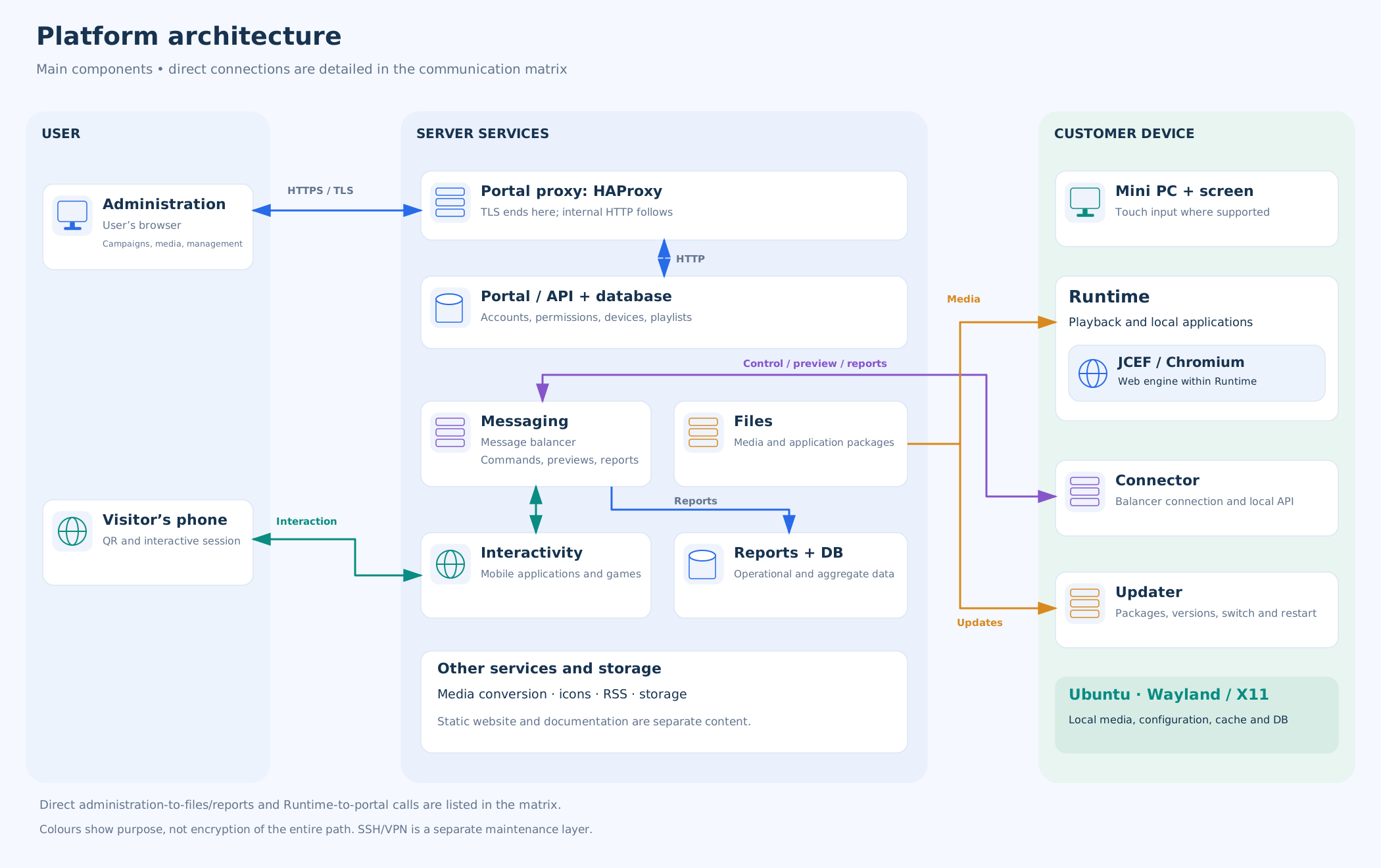
How the main data flows fit together
Preparing content. An administrator saves settings and content in the administration interface. The portal manages definitions, the file service manages media, and specialised services handle further processing. A campaign definition is not the same as its image or video file.
Displaying content on the device. Runtime retrieves configuration, applications and the playlist, downloads the necessary files and prepares them in local storage. Only prepared content can replace the active layer. Saving content in administration does not therefore confirm that it is being displayed.
Control and feedback. Connector establishes a connection to the message balancer. Commands and preview requests arrive through this connection; results and reports travel back. Runtime and Connector exchange the required data through local interfaces.
Updates and external content. Updater downloads and switches versions of playback applications. Embedded websites, weather, RSS and phone interaction use their own services; they must not be treated as a single shared transfer.
Individual paths and their protection are listed in the communication matrix.
Web administration and mobile interaction
- Web administration runs in a browser and manages accounts, devices, locations, media, campaigns and reports. Depending on the operation, it communicates with the portal and with dedicated services for media, reports, icons and remote previews.
- Visitor’s phone serves a different purpose. Scanning a QR code opens a specific interactive application. The interactive service connects that session to the appropriate device; this does not give the visitor an administration account.
Server services
- Portal and API manage users, companies, devices, campaigns and content definitions.
- Messaging service (balancer) carries messages between connected system components.
- File service stores media and distributes player application packages.
- Media conversion and icons are handled by separate components.
- Reporting service receives and provides access to operational and playback data.
- Interactive applications and RSS have their own services for the relevant features.
- Databases and file stores support individual functions; the diagram does not represent them as one shared database.
In the documented portal deployment, the application, MariaDB database, HAProxy, static website and documentation run in separate containers on one host. This describes how the services are organised. It does not, on its own, establish isolation of all customer data or continued availability if that host fails.
Software on the device
The device uses a prepared Ubuntu system image containing the player applications and their configuration. Depending on the installed variant, graphics use Wayland or X11. These are display technologies, rather than additional campaign management applications.
- Runtime displays campaigns, media and interactive content. It also includes the JCEF / Chromium web engine.
- Connector maintains the connection to the messaging service and handles messages, remote previews and maintenance operations.
- Updater updates the player applications.
Each application runs as a separate system service.
Local storage holds media, configuration, working databases, caches and other operational data. The term kiosk describes the controlled visitor environment; it is not a fourth system service.
Responsibilities
- System provider manages server services, their configuration and HTTPS certificates.
- Customer provides network connectivity, applies corporate network policies and physically secures the device. Authorised users manage content, accounts and permissions within their assigned access.
- Third parties (external providers) supply services and data used by the content, such as websites, RSS feeds and weather forecasts. Availability and data processing are governed by the relevant provider’s terms.
Use a phone as a controller: watch Maze and Wheel of Fortune video examples.
Related topics and next steps
Contact your software provider.