
Documentation / Security and data protection
Security and data protection
Introduction and orientation
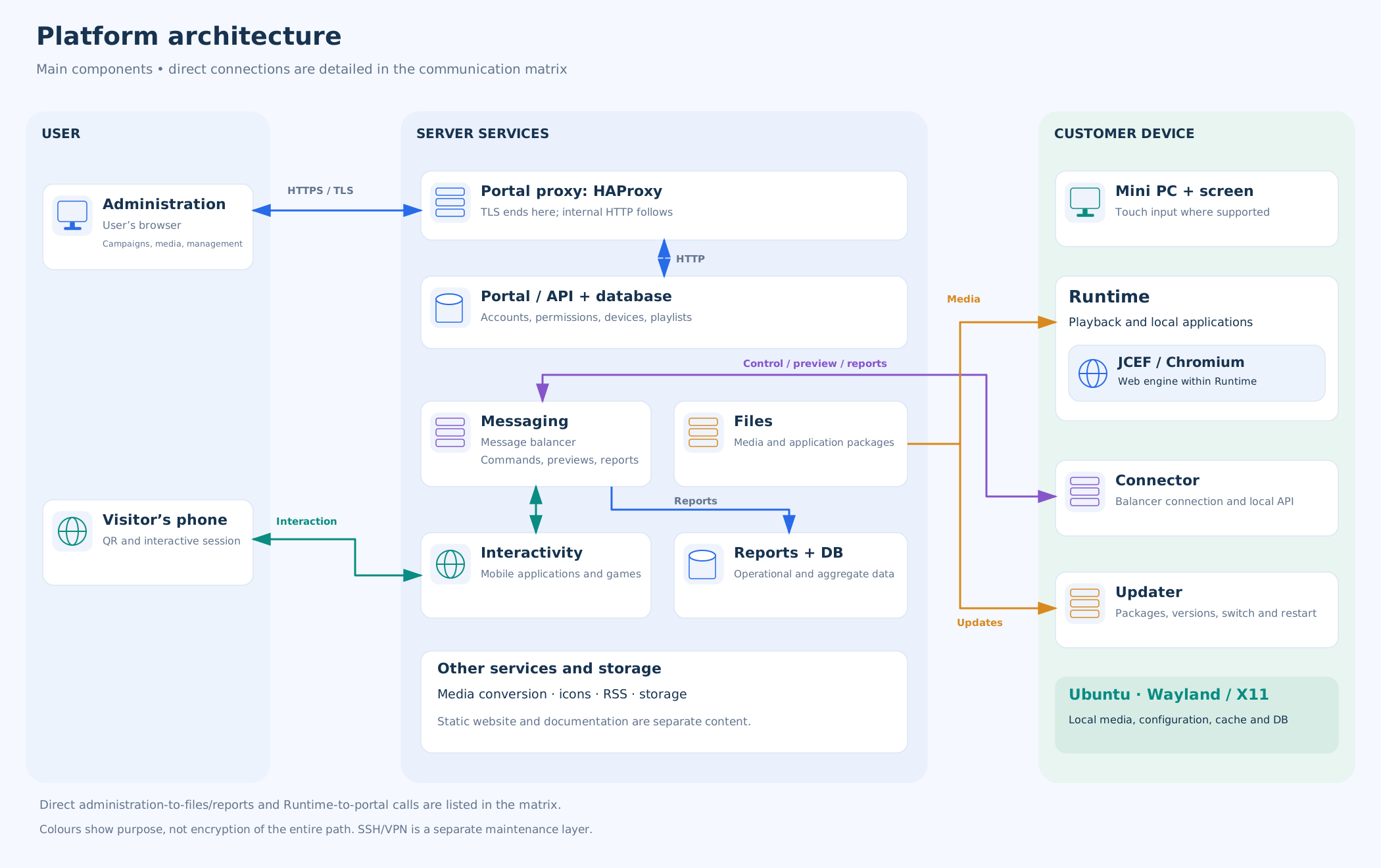
Explore the system architecture from the web administration interface through the server services to the playback device at the screen. Learn how configuration, content, commands and reports travel, how each connection is protected and who operates each part.
Start with the architecture overview. The communication matrix then identifies individual connections, protocols and ports; the other guides explain content rendering, access and data management. The glossary explains unfamiliar component names.
Guides and settings
System architectureMain system components, server services and software on the device.Communication and transport securityConnections, protocols, ports and the limits of transport protection.Player and controlled display environmentWeb rendering, touch input, sessions and the kiosk environment.Accounts and remote administrationSign-in, permissions, registration, previews and maintenance access.Content, local data and operationsContent preparation, offline operation, reports, updates and backups.System terms and components
Runtime, Connector, Updater and other terms explained in the context of the system.
Related topics and next steps
Consider architecture, transfers, access and content management together. The related operational guides explain specific settings and diagnostics.
Didn't find what you were looking for?
Contact your software provider.
Contact your software provider.