
Communication and transport security
Introduction and orientation
Find out who initiates each connection, what data it carries, and which protocols and ports it uses. The overview distinguishes transport encryption, identity verification and permission to perform an operation.
When defining network rules, distinguish cloud connections, local APIs, external content and service access. Allowing one port or encrypting one section does not automatically cover the other paths.
Overview and explanation
How to interpret connection protection
HTTPS and WSS use TLS to protect a particular connection. Identity verification establishes who is connecting; permissions determine what they may do. If a proxy terminates TLS and forwards a request over HTTP, that next section is no longer protected by the same TLS connection. Likewise, HTTPS in the administration interface does not establish that the separate Connector connection is encrypted.
The system uses several communication paths. Retrieving configuration, downloading a file, sending a control message and submitting a report are separate operations. Protection is therefore described for each part of the connection.
Access to the administration interface
- Browser and proxy: When HTTPS is used, TLS protects communication between the browser and the entry proxy.
- Certificates: The service operator manages the certificates; ordinary users do not need to obtain or install them.
- Internal transport: In the documented portal deployment, HTTPS terminates at HAProxy. The proxy forwards requests to internal web services over HTTP on the host network. TLS therefore does not extend to the application process.
- HTTPS redirects: The supplied configuration does not apply the same HTTP-to-HTTPS redirect policy to every portal and partner domain.
Configuration, media and control connections
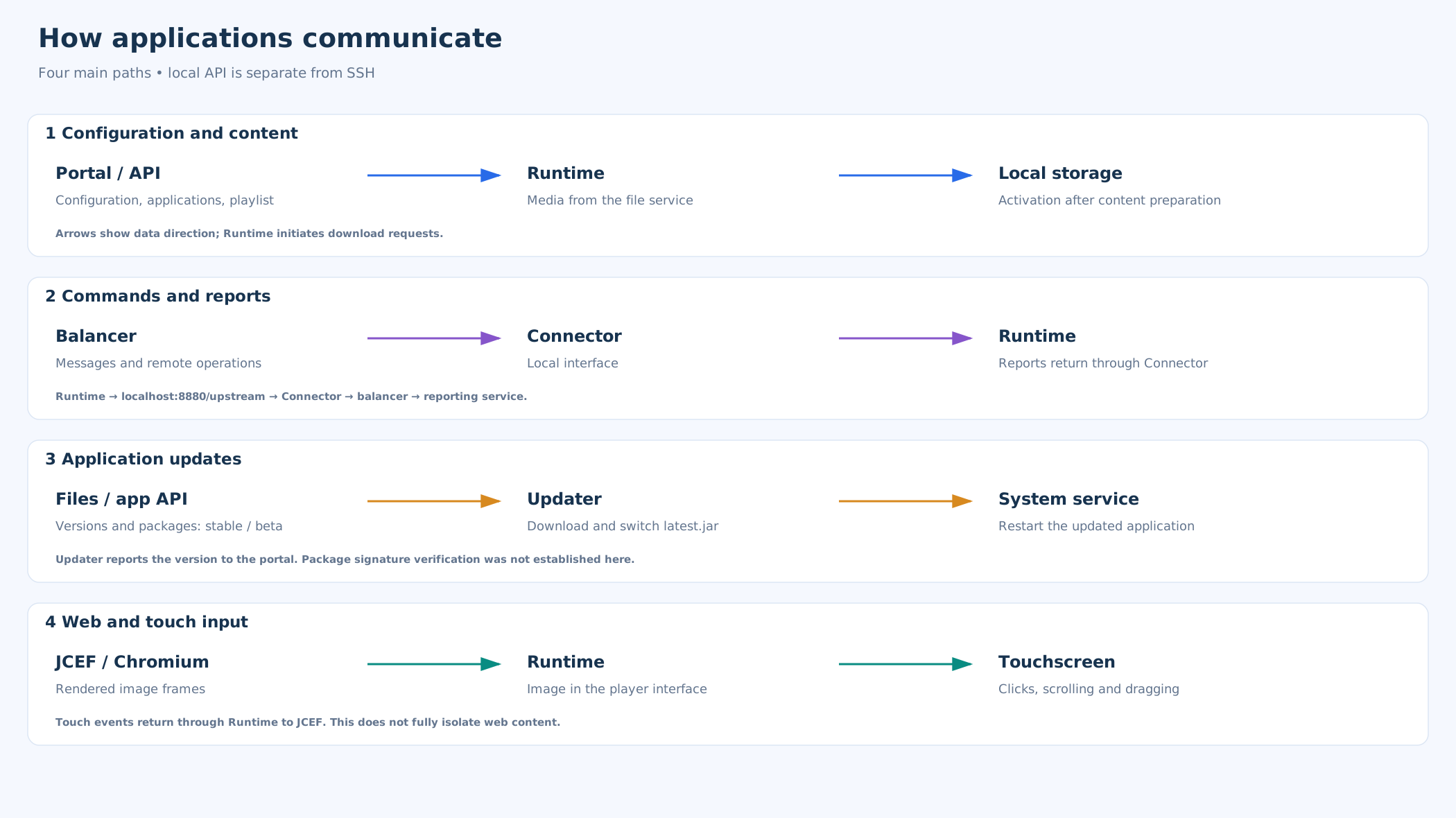
- Configuration and playlist: Runtime requests configuration, application definitions and playlists from the portal.
- Media and icons: It downloads media from the file service and icons from the icon service. The supplied production startup scripts use HTTPS URLs for the portal and files.
- Control connection: Connector initiates the connection to the messaging server. This connection carries control messages, preview requests and other operations. Responses can travel in the opposite direction over the established connection.
- Connector transport: The reviewed Connector client code and its production startup script use WebSocket on port 80 without enabling TLS. This connection cannot be described as verified WSS or as fully encrypted transport.
- Remote preview in administration: By contrast, the administration client explicitly uses WSS for remote previews. These are different clients.
Authenticating a connection, encoding messages and encrypting transport perform different tasks. An application authentication credential does not replace TLS, and a binary message format does not itself encrypt data.
Communication between player applications
- Reports: Runtime submits reports to Connector’s local interface. Connector forwards them to the messaging service, from which the reporting service processes them.
- Updates: Updater receives a local update request and contacts the file service for packages.
Local interfaces are separate from the ports needed to access cloud services. Their network binding and firewall rules determine whether they can also be reached from the customer’s network.
Calling an interface a local API does not mean that it is restricted to localhost.
External services and internet access
- Weather forecasts: The player retrieves weather forecasts from api.met.no over HTTPS using the coordinates configured for the device.
- Web applications and RSS: Web applications may connect to other domains; RSS and other data features have their own sources.
Network rules should follow the communication matrix for the services and domains in use. A device initiating outgoing connections does not establish that it has no listening services. SSH and maintenance ports are not automatically requirements for normal customer operation.
Network connections, protocols and ports
The arrow in the first column identifies the connection initiator; data can travel in both directions. Ports use TCP unless stated otherwise. The table distinguishes documented settings from configurable paths.
| Connection and initiator | Purpose and data | Protocol / port | Authentication and protection |
|---|---|---|---|
| Browser → HAProxy → API | Portal API requests and responses | HTTPS 443 → HTTP 10 | HTTP Basic on protected API paths. TLS to the proxy, then internal HTTP. |
| Browser → Files | Uploads, metadata and media | HTTPS 443 | Upload authenticates users through the portal; read access depends on the route. Client HTTPS URL. |
| Browser → Reports | Reports and dashboards | HTTPS 443 | Authentication depends on the server route. A client HTTPS URL does not verify every proxy setting. |
| Browser → Balancer | Previews, commands and responses | WSS 443 | Application authentication credential; target operation authorisation is assessed separately. The client uses WSS. |
| Browser / Runtime → Icons | Icons and related resources | HTTPS 443 | Public or protected paths depending on the feature; configured HTTPS URLs. |
| Runtime → Portal | Configuration, applications and playlist | HTTPS 443 | Application Basic credential; HTTPS in the startup script. Internal HTTP behind the portal proxy. |
| Runtime → Files | Media and documents | HTTPS 443 | Some media paths are public. An HTTPS URL does not establish a file signature. |
| Connector → Balancer | Two-way control messages, previews and reports | WS 80 | Application authentication does not encrypt the whole session. The reviewed client does not enable WSS. |
| Runtime → Connector | Reports sent towards the server | HTTP localhost:8880 | Local HTTP; accessibility outside the device depends on binding and firewall rules. |
| Connector → Runtime | Commands, game actions, previews and tasks | HTTP 8888 | Local HTTP; Runtime listens on 0.0.0.0. LAN access depends on the firewall. |
| Runtime → Updater | Triggering an update | HTTP localhost:4444 | Local HTTP; calling localhost does not establish a loopback-only listener. |
| Updater → Files | Application versions and packages | HTTPS 443 | HTTPS in the script; digital package signatures were not established. |
| Updater → Portal | Application version reporting | HTTPS 443 | Application device identity; TLS to the portal proxy. |
| Reports → Balancer | Reports received over an established connection | WS 80 | Application authentication; the release script and client do not establish TLS on this segment. |
| Reports → Portal | Definition synchronisation and user verification | HTTP(S) | Authentication and protection depend on the path and deployment URL. |
| Mobile → Game; Game → Balancer | Mobile interaction and responses | WS(S); Game V2: WSS | QR configuration and session; game V2 uses WSS to the balancer. The Connector segment has its own transport. |
| Runtime → MET Norway | Coordinates out, forecast back | HTTPS 443 | No personal account; HTTPS to the external provider. |
| Portal → MET Norway | Weather for playlist PDF export | HTTPS 443 | Separate server-side HTTPS path; does not replace device retrieval. |
| JCEF → Web | Web content, scripts and external APIs | HTTP(S) | Website-specific sign-in and cookies; portal HTTPS does not determine this path’s protection. |
| RSS → Web | RSS feeds and related content | HTTP(S) | Depends on the source URL; RSS itself does not enforce HTTPS. |
| Services → DB / Storage | Storage of definitions, media and reports | DB / filesystem | Accounts and transport depend on the service. Database connection and disk encryption were not established. |
| Backup host → Storage | Storage exports and media synchronisation | SSH / SCP / rsync | SSH keys per configuration; encrypted transport does not establish encryption of stored backups. |
| Technician → SSH / VPN | Operating system administration | SSH 22 / VPN | Separate maintenance path. Settings on one host cannot be assumed to apply to all hosts. |
Using HTTPS on one part of a path does not automatically encrypt the entire transmission.
Internet connection and network access requirements
The device needs outbound access to the services it uses and working DNS resolution. Your software provider supplies the exact destination domains and any different ports used by your deployment.
- TCP 443 and TCP 80: in the configuration described, the portal, media and icons use HTTPS on port 443. Connector initiates its control connection using WebSocket (WS) on port 80, so allowing port 443 alone is insufficient. This WS connection is not protected by TLS.
- External content: weather requires HTTPS access to
api.met.no:443. Embedded websites may need other domains and ports specified by their URLs, commonly HTTP 80 or HTTPS 443. RSS sources are fetched by the relevant server service. - Local and service ports: ports 8880, 8888, 4444 and SSH 22 do not require inbound access from the internet for normal operation. Access on the local network and servicing arrangements are handled separately.
External services
MET Norway — Locationforecast: the player initiates HTTPS/TCP 443 requests to api.met.no, sending latitude and longitude to retrieve weather forecasts for dynamic visuals. The portal uses a separate path for playlist PDF exports. Other sources include websites and RSS feeds configured for the content.
For using weather data to select campaign visuals, see Weather-based targeting
Related topics and next steps
Contact your software provider.