
Dynamic Visuals
Introduction and orientation
Automatically change campaign visuals according to time, weather and other verified conditions.
Primary and Dynamic Visuals
Every campaign has one primary visual. It is required and is selected in the previous Visual step. You can add any number of Dynamic Visuals to it. A Dynamic Visual is used only when the conditions assigned to it are met.
Steps and settings
How to add a Dynamic Visual
- In Campaign Editor, finish selecting the primary visual and go to step 5 – Dynamic Visual.
- Click the + button in the bottom-right corner. This adds a new Dynamic Visual group.
- Expand the group and set the conditions under which the visual should be active. You can use time of day, days of the week, air temperature, humidity, wind speed and weather conditions.
- Select the visual that should be shown when the conditions are met. To add another Dynamic Visual or another rule, add another group with +.
- Set the Visual playback rules depending on whether only the first matching Dynamic Visual should be used, all matching Dynamic Visuals should rotate, and whether the primary visual should remain in the rotation.
- Continue with NEXT and finish the campaign.
Conditions in one group are combined. For example, if you set Monday + 11:00–13:00 + temperature above 25 °C, the visual is used only when all three conditions are met. If no Dynamic Visual is assigned to a group, the empty group is automatically removed after saving.
Visual playback rules
Dynamic Visuals – Rotate all matching, one per loop
Off: if several Dynamic Visuals match, the first one according to editor order is used. On: all matching Dynamic Visuals rotate between campaign loops, one visual per loop.
Primary Visual – Always include in rotation
Off: as soon as at least one Dynamic Visual matches its conditions, the primary visual is replaced. On: the primary visual remains in the rotation together with the matching Dynamic Visuals.
Practical examples
Rotate 5 visuals all day
Use 1 primary + 4 Dynamic Visuals. Set every Dynamic Visual to 00:00–23:59 and all days, then enable both playback rules. The resulting rotation is: primary → dynamic 1 → dynamic 2 → dynamic 3 → dynamic 4 → primary → …
Use a different visual at lunchtime
Keep the primary visual as the normal content. Add a Dynamic Visual such as “Lunch menu” and set Monday–Friday and 11:00–14:00. If the primary visual should not appear during this period, leave Primary Visual – Always include in rotation disabled.
Use a visual based on weather
Add a Dynamic Visual and set, for example, a required temperature or weather condition. The visual is used only while the condition matches. Time, day and weather conditions can be combined within one group.
Weather-based targeting
Where the data comes from
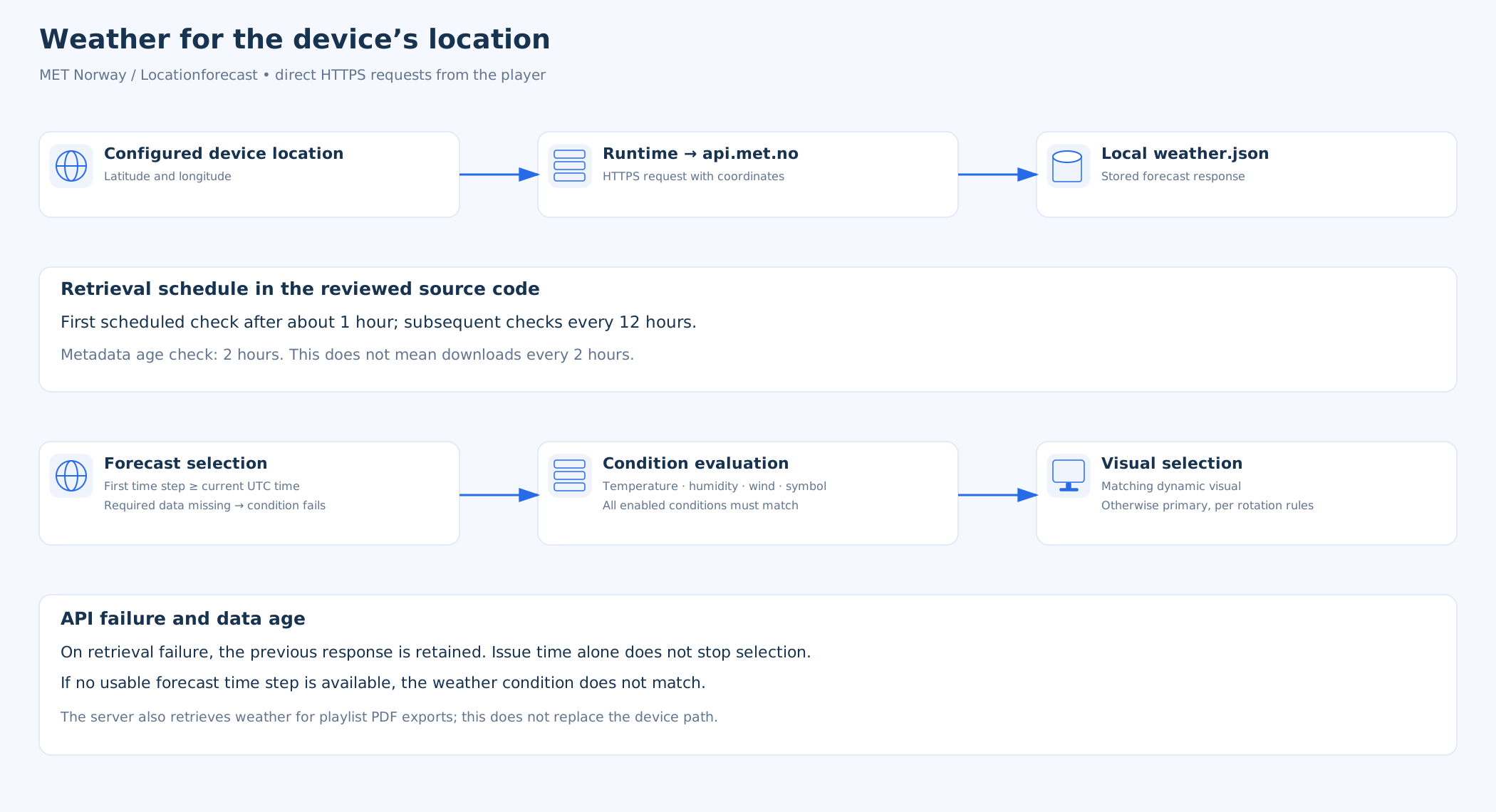
Weather data is supplied by the Norwegian Meteorological Institute, MET Norway, through its Locationforecast service. The player uses the latitude and longitude configured for the device. It retrieves forecasts directly over HTTPS for those coordinates and stores them locally. This is not a reading from a screen-mounted sensor or automatic GPS location detection.
Data source: MET Norway — Locationforecast. See the provider’s Licensing and Data Policy for attribution and applicable licences, including NLOD 2.0 and CC BY 4.0.
Supported conditions
The reviewed player evaluates air temperature in °C, relative humidity in %, wind speed in m/s and selected weather symbols. Symbols may represent rain or cloud cover, for example; this does not establish support for separate numerical thresholds for precipitation amounts or cloud cover percentages.
All enabled weather conditions must match. Selected symbols form a set of permitted values. Temperature, humidity and wind speed are rounded to whole numbers for comparison, and range boundaries are inclusive. Time and day conditions are evaluated together with the weather.
Selection uses the first available forecast time step at or after the current evaluation time in UTC. The symbol comes from the forecast for the following hour at that time step. This is not a guarantee of a live measurement at the exact second of playback.
Forecast refresh
The reviewed scheduler schedules its first check approximately one hour after starting, followed by checks every 12 hours. A check may skip downloading depending on the stored forecast’s update time. A two-hour metadata age check does not mean that data is downloaded every two hours.
If a request fails, previously retrieved data remains available. Evaluation does not reject a forecast solely because its issue time is old: a usable time step and the required values also matter. If the required data or time step is missing, the corresponding weather condition does not match.
Which visual is played
Evaluation takes place when selecting the campaign’s next visual. The player selects a matching dynamic alternative according to the configured rotation mode. If none matches, it uses the primary visual according to the selection rules. Weather changes do not immediately interrupt an advertisement already playing.
If a new forecast is unavailable, the player may therefore continue using stored forecast data rather than immediately switching to the primary visual. A complete audit record of weather values, rules and every alternative selection was not established in the playback report.
Network and privacy
Requests to api.met.no contain the requested location’s coordinates. With direct access, the provider also sees the connection’s source IP address. This path does not transmit the campaign’s media file; other application functions use their own connections.
The portal also retrieves weather separately when generating a playlist PDF export. This does not replace the device’s own ongoing retrieval. Availability of an external service is separate from the availability of local playback.
Supported location: in the reviewed player source code, weather is not fetched if either latitude or longitude is between −1° and +1°, inclusive. This also affects some valid locations near the equator or prime meridian. If this applies to your location, check version support with your software provider. It is not a limitation of the MET Norway service itself.
Multiple condition groups
If several groups match at the same time, the result depends on the Dynamic Visual playback rule. With rotation disabled, the first matching visual according to editor order is used. With rotation enabled, all matching Dynamic Visuals rotate progressively.
Related topics and next steps
← Back to overview – Campaigns
Contact your software provider.